Advanced IP Scanner for Mac and Linux
Advanced IP Scanner is one of the most widely used network utilities in Windows environments. Because Famatech has never built a native macOS or Linux version, Open Port Scanner is a cross-platform solution.
Download Open Port Scanner v2.0
Native Universal binary for Apple Silicon & Intel • Linux x64 • Windows
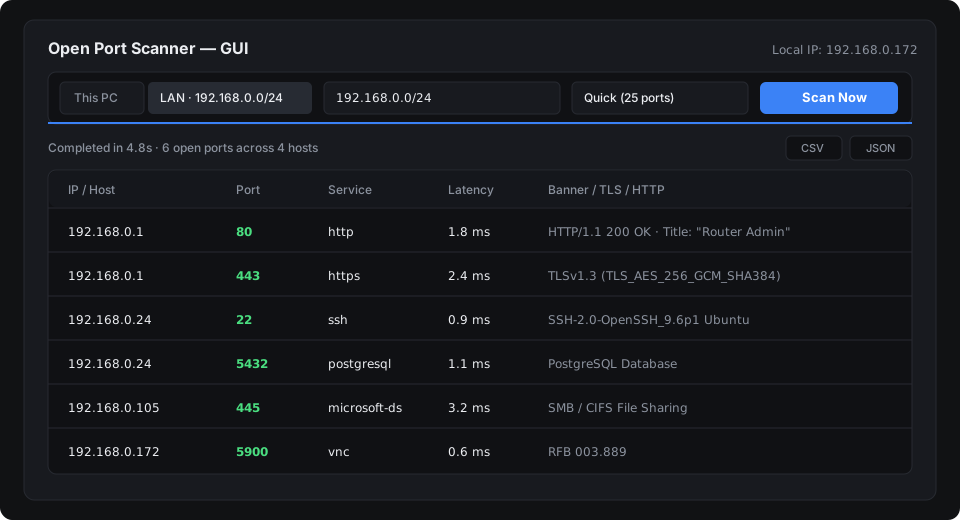
Can you run Advanced IP Scanner on macOS or Linux?
Not natively. The official Advanced IP Scanner installer only runs on Windows (x86/x64). Common workarounds include:
- Running via Wine / CrossOver: Network layer discovery and ARP table inspection frequently fail or freeze inside compatibility layers.
- Virtual machines (Parallels / VMware): Spinning up a Windows virtual machine simply to find a local IP address consumes 4+ GB of RAM and considerable setup time.
Side-by-side comparison
| Feature | Open Port Scanner | Advanced IP Scanner |
|---|---|---|
| Supported OS | macOS (M1-M4 & Intel), Linux, Windows | Windows only |
| Installation Required | No (single portable executable) | Installer required |
| Subnet Detection | Automatic /24 LAN detection | Auto C-class detection |
| Port & Service Scanning | Built-in presets (25, 96, custom ports) | Fixed common ports (HTTP, FTP, RDP) |
| HTTP & SSH Banner Grabbing | Yes (HTTP Status, Title, Server, SSH version) | Limited NetBIOS / Radmin checks |
| CLI / Automation | Yes (flags: --json, --lan, -o) | No CLI support |
| License | MIT Open Source | Proprietary Freeware |
How to discover connected network devices on Mac and Linux
Option 1: Graphical desktop interface
Launch port-scanner by double-clicking the binary or running it from Terminal. The app automatically populates your active local subnet (e.g. 192.168.1.0/24). Select the LAN button and click Scan. Active devices, open ports, and server titles appear in real time.
Option 2: Terminal command
If you are working over an SSH connection or prefer the command line:
# Scan your local LAN with the quick preset:
./port-scanner --lan --profile quick

# Save output to JSON for documentation or reporting:
./port-scanner --lan -o network-inventory.json