How to scan a local network for open ports
Scanning your home or office local area network (LAN) helps identify connected devices, unauthenticated admin dashboards, misconfigured database ports, and rogue services. Here is how to map all active network hosts in seconds.
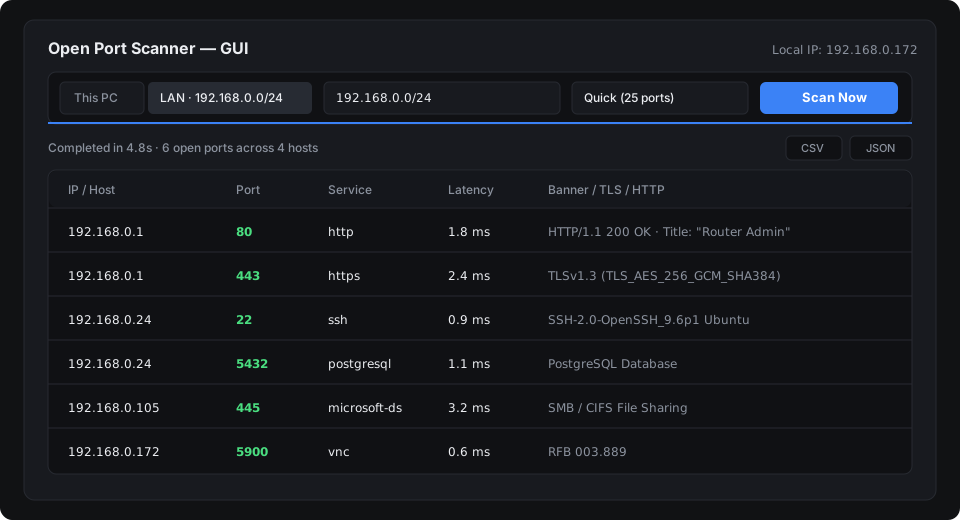
Step 1: Download and launch
Unlike tools that require Python or Java installation, Open Port Scanner ships as a single portable machine-code binary (~2-4 MB).
- Windows: Download
port-scanner-windows-x64.zip, extract, and double-clickport-scanner.exe. - macOS: Download
port-scanner-macos.tar.gzand launch the universal binary. - Linux: Download
port-scanner-linux-x64.tar.gzand execute in terminal or desktop window.
Step 2: Subnet scan via desktop interface
When you launch the desktop app, the scanner automatically identifies your active network interface and calculates the local /24 subnet (such as 192.168.1.0/24 or 10.0.0.0/24).
- Click the local network target button (showing your detected subnet range).
- Select a port preset:
- Quick (25 ports): Web (80, 443), SSH (22), RDP (3389), VNC, and common remote access ports.
- Standard (96 ports): Commonly exposed TCP services.
- Web (19 ports): Common development and web servers (80, 443, 3000, 5173, 8080, 8443).
- Databases (17 ports): PostgreSQL, MySQL, Redis, MongoDB, and MSSQL.
- Click Scan. Active devices and open ports appear with response latency and detected service banners.
Step 3: CLI method (Terminal and automation)
If you are working over SSH or automating daily security audits, run the scanner with command-line flags:
# Scan entire detected subnet with the quick profile:
port-scanner --lan --profile quick

# Scan a specific subnet with custom ports and export to JSON:
port-scanner 192.168.1.0/24 -p 22,80,443,3389 -o lan-report.json

# Scan only your local machine:
port-scanner 127.0.0.1 --profile full
Common open ports to check
| Port | Service | Security Risk on Local Network |
|---|---|---|
| 22 | SSH | Ensure password authentication is disabled; use public keys. |
| 80 / 443 / 8080 | HTTP / Web | Router admin portals, IP cameras, printers, and NAS panels. |
| 445 | SMB | Windows file sharing; should never be exposed externally. |
| 3389 | RDP | Remote Desktop Protocol; vulnerable to brute-force attacks if unprotected. |
| 5432 / 3306 / 6379 | PostgreSQL / MySQL / Redis | Databases should strictly require strong authentication and bind to localhost unless clustering. |
Exporting and reporting
After the scan completes, click CSV or JSON in the top-right toolbar. The report automatically saves to your Downloads or Desktop folder and copies the text to your system clipboard for instant pasting into documentation.