Advanced Port Scanner for macOS and Linux
Famatech's Advanced Port Scanner is limited to Microsoft Windows. For users on macOS or Linux who need a subnet scanner with a desktop interface, Open Port Scanner is a native cross-platform alternative.
Is there an official Advanced Port Scanner for Mac or Linux?
No. Famatech has never released a macOS or Linux edition of Advanced Port Scanner. Common workarounds on non-Windows systems each carry trade-offs:
- Nmap / Zenmap: Capable, but requires root privileges, packet capture drivers, and detailed syntax knowledge for basic sweeps.
- Angry IP Scanner: Cross-platform, but requires an external Java runtime (JRE) installation.
- Wine / Emulation: Running Windows network utilities via Wine often produces incomplete results because low-level socket APIs behave differently in emulation.
Open Port Scanner vs. Advanced Port Scanner
Open Port Scanner compiles directly to native machine code on macOS, Linux, and Windows:
| Feature | Open Port Scanner | Advanced Port Scanner |
|---|---|---|
| Supported OS | macOS (Apple Silicon & Intel), Linux, Windows | Windows only |
| Subnet Detection | Automatic /24 subnet discovery | Class C subnet auto-detect |
| Footprint | Standalone ~2-4 MB binary (no install) | Installer required |
| Service Inspection | 120+ ports, HTTP status, title, Server & SSH | HTTP, FTP, RDP, NetBIOS |
| Automation & CLI | Full CLI (--json, --lan, -o) | GUI only |
| License | MIT (Open Source) | Proprietary Freeware |
How to scan your LAN on macOS and Linux
1. Desktop GUI
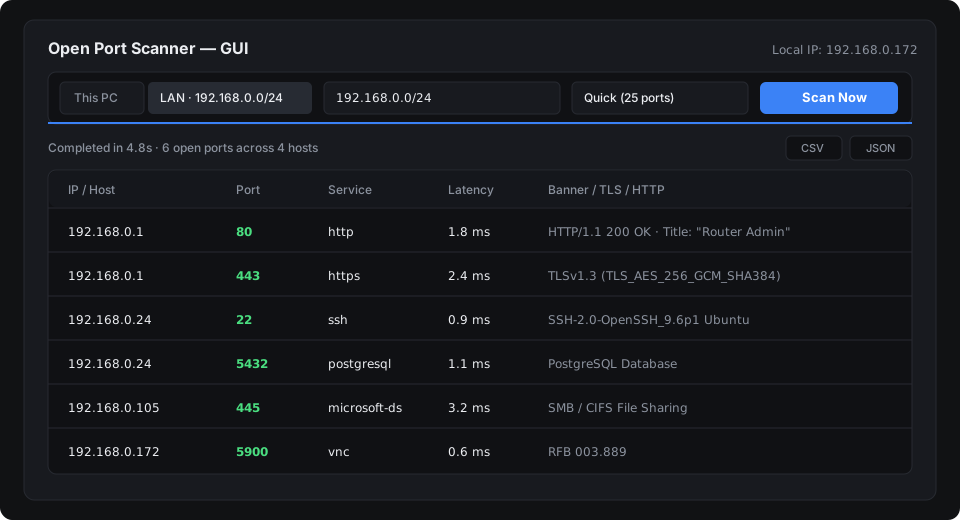
Download the standalone release for macOS or Linux, run the binary, and select the LAN subnet target (or run with --gui). The scanner probes your local subnet for active web servers, SSH daemons, databases, and network hardware.
2. Command-line interface
For automation, headless servers, or quick terminal checks:
# Scan your active local subnet:
./port-scanner --lan --profile quick

# Scan a gateway host and save results to CSV:
./port-scanner 192.168.0.1 --profile full -o gateway-ports.csv