Open port checker and fast IP network port scanner
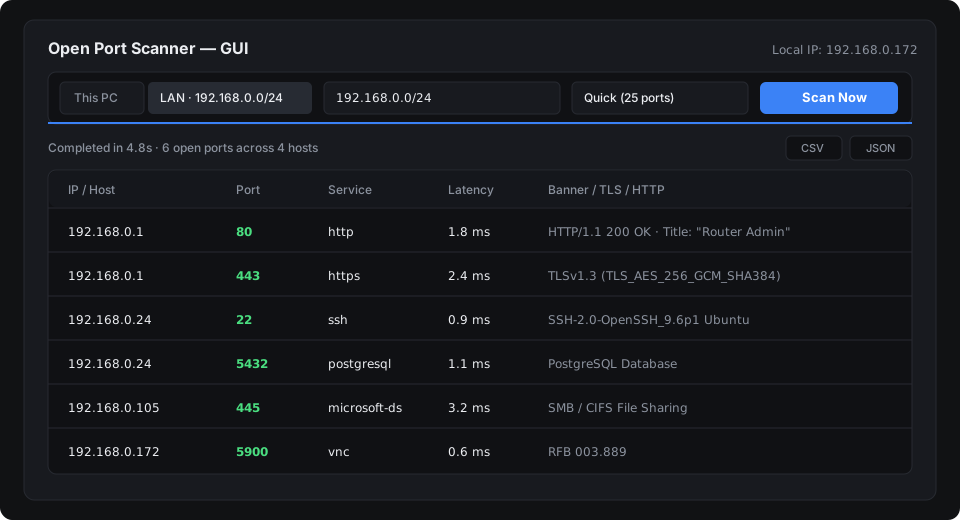
Open Port Scanner is an async TCP port scanner and local subnet mapper written in Rust. Check localhost or scan all 254 subnet hosts in seconds from a desktop GUI or CLI, with no runtime dependencies.
Why developers and sysadmins use it
Native Rust async engine
Built on Tokio, it sweeps hundreds of hosts and thousands of ports in parallel without socket exhaustion or high CPU load.
One-click LAN scan
Automatically detects your active Wi-Fi or Ethernet /24 subnet while ignoring loopback and virtual VPN TUN ranges (198.18.0.0/15).
Zero dependencies (no Java or Npcap)
Runs natively on Windows (.exe), macOS, and Linux without installing JRE, Python, or kernel packet capture drivers.
Banners and HTTP titles
Captures SSH greetings, HTTP status codes, Server headers, and HTML page titles alongside millisecond latency measurements.
CSV and JSON export
Save reports directly to Downloads or Desktop, or copy formatted data to your clipboard for audit documentation.
Small standalone binary
Ships as a single 2 to 4 MB executable. Copy it to a USB drive or run it on servers without package managers.
Guides, comparisons, and tutorials
Angry IP Scanner alternative without Java
Port scanner with native desktop UI and no Java runtime required.
Advanced Port Scanner for macOS and Linux
Cross-platform alternative to Famatech Advanced Port Scanner for Apple Silicon, Intel Macs, and Linux.
Advanced IP Scanner for Mac and Linux
Discover IP addresses and open services on macOS and Linux without Wine or virtual machines.
Lightweight Nmap alternative
Fast subnet sweeps and banner checks without Npcap drivers or root privileges.
Port scanner vs Masscan and Nmap
How bounded Tokio concurrency prevents router state exhaustion during LAN sweeps.
How to scan a local network for open ports
Step-by-step tutorial on scanning a local /24 subnet via GUI and CLI.
Check open ports on Windows (PowerShell and CMD)
Using netstat, Test-NetConnection, and Open Port Scanner on Windows 10 and 11.
Check open ports on Mac (Terminal and GUI)
Using lsof, netcat (nc), and native macOS port scanning tools.
Check open ports on Linux (ss, lsof, and CLI)
Audit local listening sockets and remote servers across Ubuntu, Debian, and RHEL.
Common network ports cheat sheet
Reference table for TCP infrastructure, web development, and database ports.
Find all connected devices and IP addresses
Locate Raspberry Pis, network printers, NAS servers, and routers on your Wi-Fi.
Scan Docker and Kubernetes container ports
Audit exposed 0.0.0.0 container bindings and Kubernetes NodePorts.
Audit routers, IP cameras, and IoT devices
Spot open Telnet, unencrypted HTTP panels, and exposed RTSP camera streams.
Quick installation and usage
# Install via Cargo (crates.io):
cargo install open-port-scanner

# Scan your auto-detected local network (/24 LAN):
port-scanner --lan --profile quick

# Scan specific ports on a host or CIDR and export to JSON:
port-scanner 192.168.1.0/24 -p 22,80,443,3389 -o report.json

# Launch the desktop GUI:
port-scanner --gui
Feature comparison
| Tool | Engine / Runtime | Footprint | Platforms | 1-Click LAN Scan | License |
|---|---|---|---|---|---|
| Open Port Scanner v2.0 | Native Rust (Tokio) | 2-4 MB | Windows, macOS, Linux | Yes (Auto /24) | MIT (Free) |
| Angry IP Scanner | Java (Requires JRE 8+) | ~20 MB + 150 MB JRE | Windows, macOS, Linux | Manual IP range | GPL v2 |
| Nmap / Zenmap | C++ (Requires Npcap) | ~80 MB + Driver | Windows, macOS, Linux | CLI flags / XML | NPSL |
| Advanced Port Scanner | C++ | ~25 MB installer | Windows only | Yes | Freeware |