Angry IP Scanner alternative without Java
Angry IP Scanner (ipscan) is a familiar network utility, but running it requires a Java Runtime Environment (JRE). Open Port Scanner is a native alternative compiled in Rust with zero runtime dependencies.
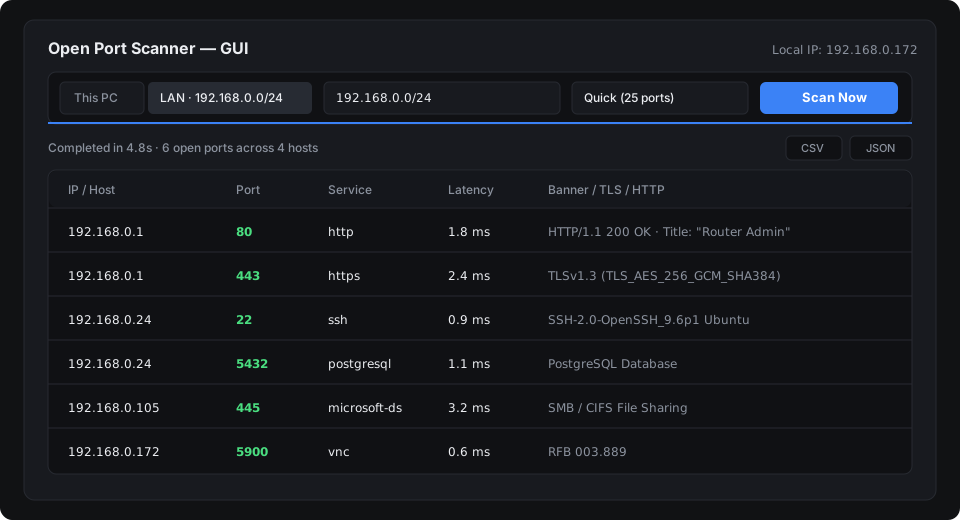
Why look for an alternative to Angry IP Scanner?
While Angry IP Scanner has served network administrators for years, its architecture introduces challenges in modern environments:
- Java dependency: Running ipscan requires installing and updating a 150+ MB Java runtime, which many locked-down corporate systems or clean laptops do not have.
- Manual subnet configuration: Users need to look up their current IP address and type starting and ending IP addresses by hand.
- Plug-in requirements for banners: Inspecting HTTP page titles, web server banners, and SSH version strings requires additional configuration.
Open Port Scanner vs. Angry IP Scanner
| Feature | Open Port Scanner | Angry IP Scanner |
|---|---|---|
| Runtime Dependencies | None (native Rust binary) | Requires Java (JRE 8+) |
| Download Size | ~2.1 MB (.exe) / ~4.4 MB (macOS) | ~20 MB + 150 MB JRE |
| Subnet Detection | Automatic /24 LAN detection | Manual IP range entry |
| Interface | GPU desktop GUI (egui) + scriptable CLI | Java desktop window |
| Banner Grabbing | Built-in (SSH, HTTP Status, Server, Title) | Requires separate fetchers |
| Automation & Export | CLI flags (--json, --lan, -o) | Command-line wrapper via Java |
| License | MIT | GPL v2 |
Main differences
1. Portable standalone binary
Open Port Scanner ships as a single executable with no installer, no DLL dependencies, and no runtime framework. You can run port-scanner.exe from a USB drive or deploy it directly to a server.
2. Automatic subnet detection
Instead of finding your adapter IP and typing address ranges, selecting the LAN subnet target (or running port-scanner --lan) automatically identifies the primary network interface while filtering out loopback and virtual VPN ranges (such as 198.18.0.0/15).
3. Asynchronous Tokio architecture
Open Port Scanner uses asynchronous TCP sockets with bounded concurrency. It sweeps hosts and ports in parallel with configurable timeout and concurrency limits.
Usage examples
# Scan your entire local subnet in one command:
port-scanner --lan --profile quick

# Scan a specific IP range and export results to JSON:
port-scanner 192.168.1.0/24 -p 22,80,443,3389 -o network-audit.json

# Launch the desktop interface:
port-scanner --gui
Summary
For administrators and developers who need a lightweight, self-contained port scanner without a Java runtime, Open Port Scanner offers fast local subnet discovery, service banner extraction, and structured JSON and CSV output.